
The original Blackboard
Where students were getting stuck.
Most students at George Brown use Blackboard every day to find assignments, check grades, and keep up with course updates. It's also the platform they complain about the most. Across a team research project in first year and a formal usability test in second year, three problems kept showing up.
At a glance
Three years, three iterations of the same project — research, testing, and a current revisit across four schools.
5
Students tested the Figma prototype I built in first year, during a second-year course
6
Real courses populated with content, instructors, and grade data
3
Years between the first design and this current revisit — three distinct iterations
4
Canadian universities the design was re-skinned across
01
Important announcements get buried.
Every course in Blackboard has its own sidebar of links, and the announcements link sits inside it as one item among many. When an instructor posts something time-sensitive, students don't see it unless they go looking.
72%
Error-free completion on the announcements task — the lowest of the three tasks tested. Satisfaction score: 3.0/5.
02
The homepage doesn't help you decide what to do next.
When a student logs in, Blackboard drops them on a long list of recent activity. There's no greeting, no schedule, no sense of what's urgent.
0
Things on the homepage that answered the question a student was actually arriving with. Everything was at least one more click away.
03
Every course page looks different.
Each instructor sets up their own course page in Blackboard, which means the layout changes between every class. One student described it as "I just guess where things are."
8–25
Range of sidebar links across the six courses in our test student's Fall semester.
Research
How I learned what mattered.
The project has been through three phases over three years. A first-year team project gave us the research, the persona, and a full Figma redesign. A second-year course gave the original prototype a proper usability test. The current revisit takes everything we'd learned and turns it into a real, working product.
Kevin H.
Second-year Interaction Design student
School
George Brown College
Semester
Fall 2022
How Kevin uses Blackboard
- — Opens Blackboard several times a day, usually goes straight to grades or upcoming work
- — Studies after 6 PM, often on a laptop with the brightness turned down
- — Tracks six courses, several instructors, and a moving list of assignments at the same time
Usability test
5 participants · year-one Figma prototype
Task
Complete
Error-free
Sat. /5
Check course announcements
100%
72%
3.0
Check the grade for an assignment
100%
92%
4.0
Download the course outline + slides
100%
92%
3.3
The announcements task scored lowest on both error-free completion and satisfaction. It became the loudest signal driving the redesign.
How the project unfolded
01
Fall 2022 · IA course · 3 months
My first ever UX project, in the first semester of my Interaction Design program. I led a team of three through the full design process — peer surveys and interviews, persona work, lo-fi sketches, mid-fi wireframes, high-fi screens, an interactive Figma prototype, a walkthrough test, and a written report on what to improve.
02
Year 2 · Usability Testing course · 2–3 weeks
For the final project of my Usability Testing course, I came back to Blackboard. I'd learned how to structure tests properly by then, so I ran a five-participant walkthrough on the Figma prototype from first year and wrote a formal report on what worked, what didn't, and what to fix.
03
May 2026 · Solo revisit · 2 weeks
Three years on, with more design experience and modern tools. I came back to evolve the project — translated the Figma into a working React prototype, refined the visual language, improved the interactivity, fixed the issues earlier testing had surfaced, and expanded the design to hold across four Canadian universities.
The redesign
Three design moves that answered the research.
Each of the three biggest problems from the research got a direct answer in the redesign. Here's how the original Blackboard handled them, what the new design does instead, and why.
01
A homepage that helps you decide what to do first.
Original Blackboard
A long, undifferentiated feed of recent activity.
Redesign
A single "what to do next" card opens the homepage.
Why
The hardest part of a student's day isn't finishing the work, it's figuring out what to start.
The redesigned homepage. Priority Card lives inside the welcome banner.
02
A course page that works the same way every time.
Original Blackboard
Every instructor configures their own course sidebar, and they all pick a different layout.
Redesign
Every course uses the same five-tab layout: Modules, Assignments, Resources, Syllabus, Instructor.
Why
Inconsistency is friction that compounds. Standardising the page lets students build a habit and stop guessing.
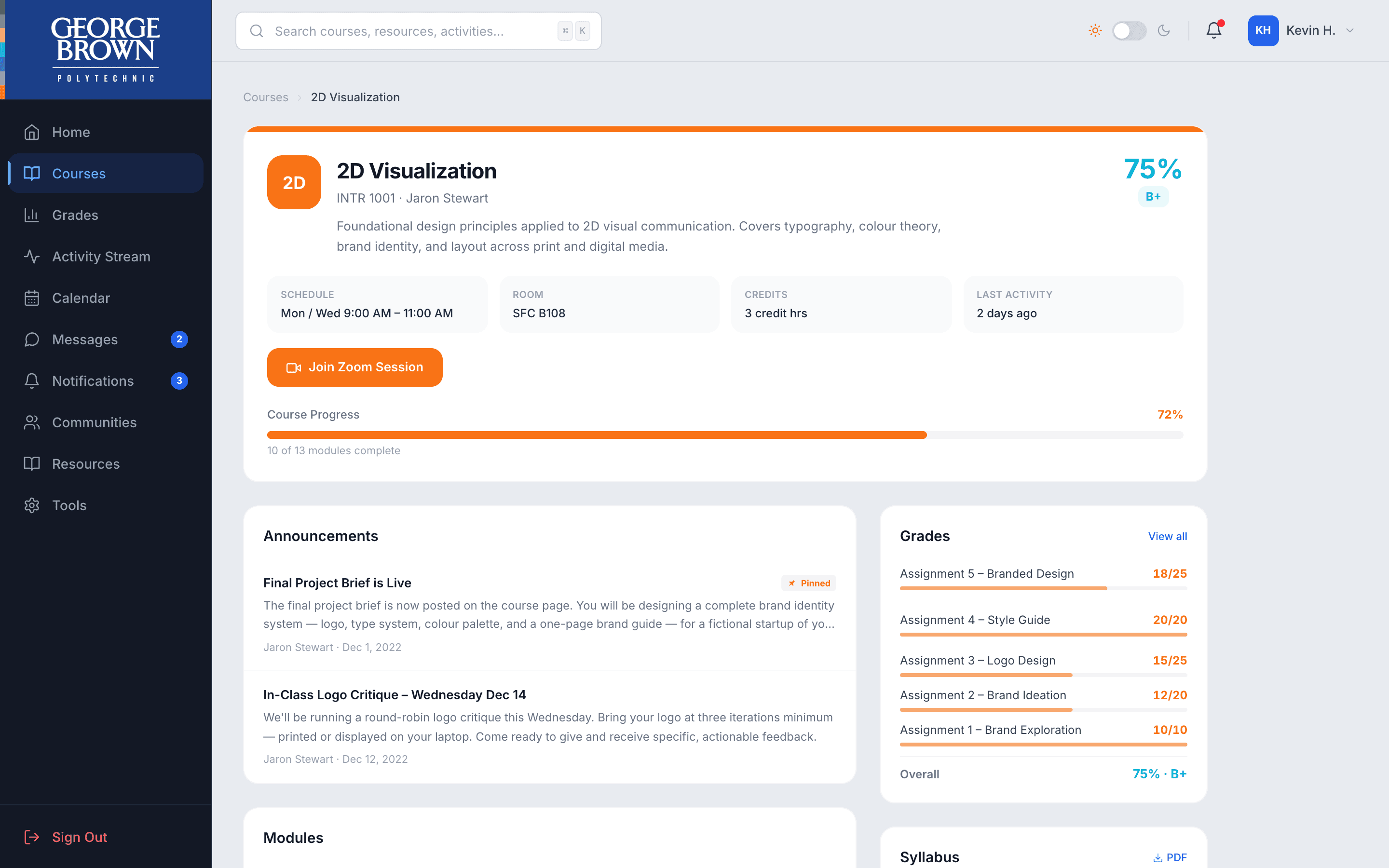
Standardised course page. Same five tabs in every course.
03
Announcements that come to you.
Original Blackboard
Course announcements live inside the course itself, behind a sidebar link.
Redesign
Every announcement appears in three places automatically.
Why
This problem scored the worst in the usability test, both for difficulty and satisfaction.
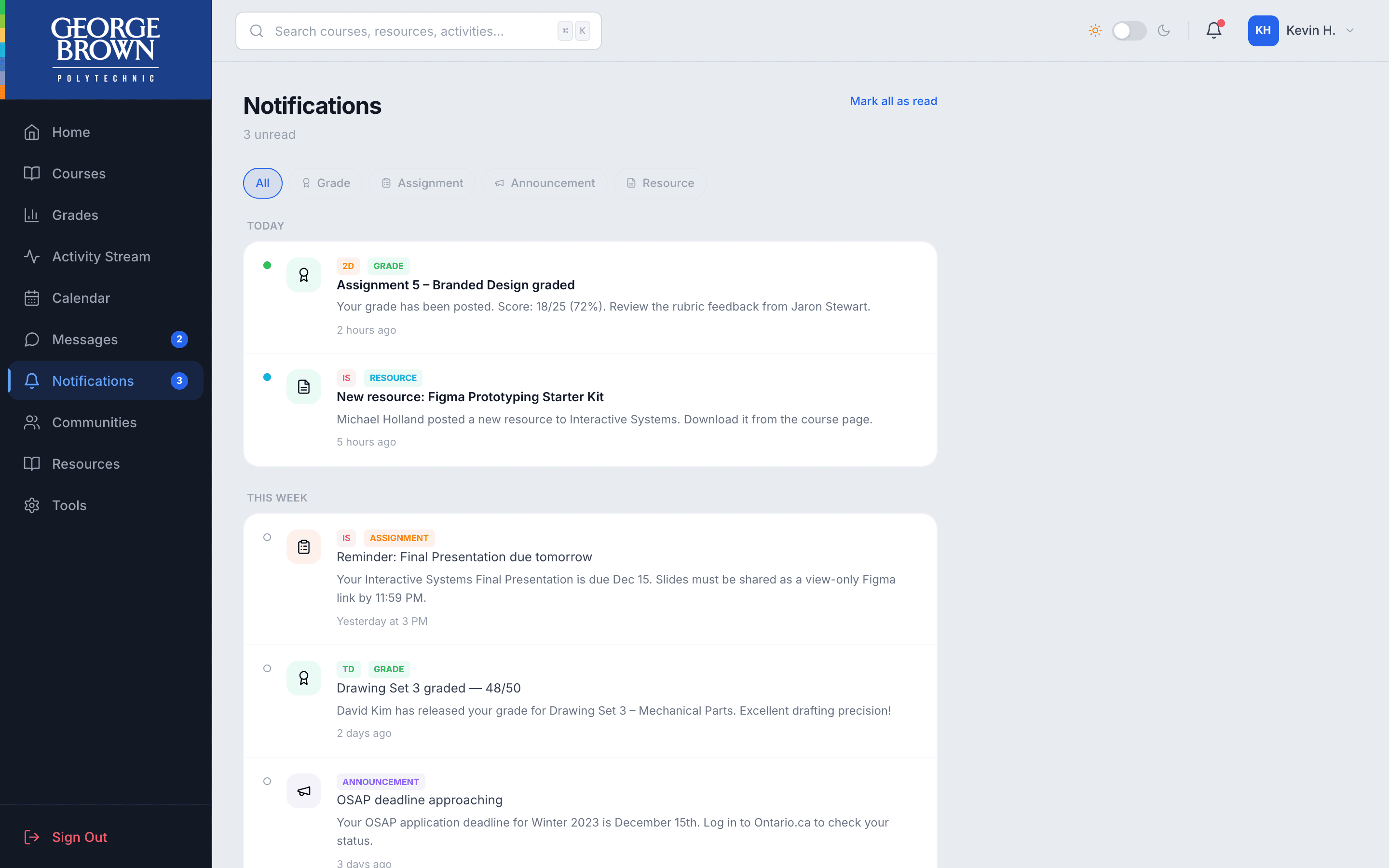
Notifications Centre. Announcements show up here, on the homepage, and pinned to the course.
Before and after
The homepage, up close.
The homepage was the most-changed screen in the redesign. Same student logging in on the same morning, but a different first impression and a different set of answers ready before they touch anything.
The redesigned homepage
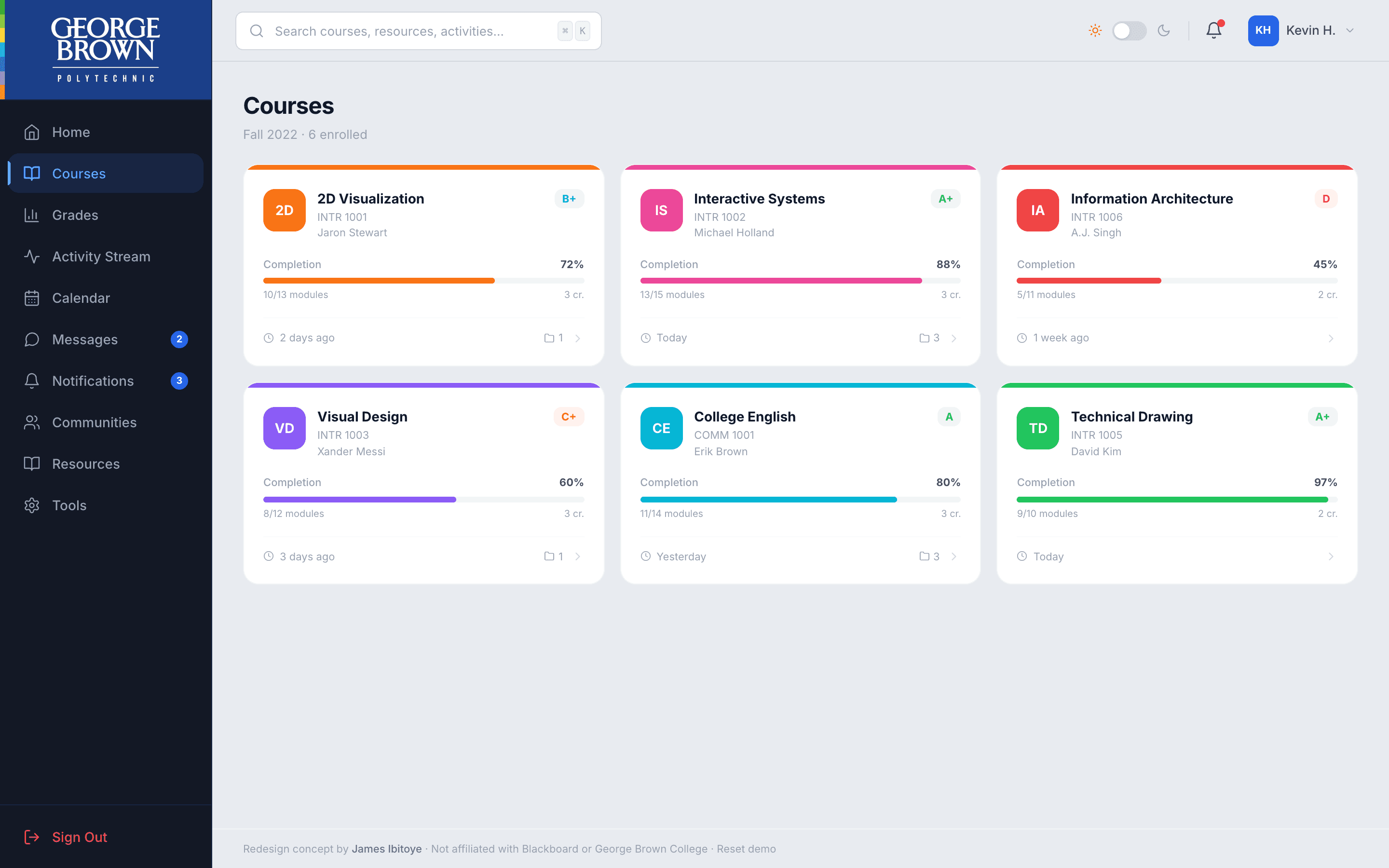
A welcome with the student's name and next class, a recommended action up top, today's classes, the next few deadlines on a timeline, recent grades, and a small calendar.
What specifically changed
Before
After
Login lands on an activity feed
→
Login lands on a real homepage
Everything weighted the same
→
One recommended action at the top
No greeting, no class schedule
→
Welcome by name, today's classes shown
Deadlines hidden inside each course
→
All upcoming deadlines on one timeline
Only course-average grades visible
→
Recently returned grades shown by assignment
No calendar without clicking to the page
→
A small month calendar visible on load
A day in the redesign
What a Wednesday looks like for Kevin.
A walkthrough of how a student moves through the redesign on a normal day. Click a step to see that screen, and hover the screenshot to watch the interaction.
Step 01 of 05
Kevin opens Blackboard.
His next class starts in fifteen minutes, and the homepage tells him that right away. The recommended action up top is a project due tomorrow.
Hover the screenshot to play the screen recording.
Made for every student
Designed for how students actually use it.
Most students aren't sitting at a quiet desk in the middle of the day. They open Blackboard at night on a borrowed laptop, on the bus between classes, or with assistive software running in the background.

The same homepage in dark mode. The palette shifts but the layout, content, and behaviour don't change — so a student studying at night gets the same product, just easier on the eyes.
Who the redesign is built for
Students studying late at night
A full dark mode that's available from the top of every page. Same product as the light version, just less harsh when the room is dim.
Students using only a keyboard
Every clickable thing in the app can be reached without a mouse. A jump-to-content link at the top lets keyboard users skip past the sidebar.
Students using a screen reader
Every icon button has a written-out label that screen readers can read aloud. Status messages are announced too.
Students with motion sensitivity
If a student has reduced motion turned on in their device settings, the redesign respects that. Animations switch off automatically.
Students who need bigger text or higher contrast
A settings panel on the profile page lets students turn on larger text, higher contrast, or motion reduction directly inside the app.
One design, four schools
Does the redesign still work in someone else's colours?
Blackboard is the same platform at most Canadian colleges, but each school customises it with their own logo, colours, and branding. To test whether the redesign held up in a real-world scenario, I re-skinned the prototype for three more Canadian universities alongside George Brown.
What stays the same
The redesign itself.
- The same five-tab course page layout, regardless of school
- The same homepage structure and recommended-action card
- The same accessibility features in light and dark mode
- The same component library — every button, card, and pill
- The same typography across all four schools
What changes per school
The skin around it.
- School logo and name in the sidebar header
- Primary brand colour — navy, red, purple, or maroon
- Trim stripe at the top of the sidebar
- Welcome banner gradient on the homepage
- Active navigation pill, link, and button colours
Reflection
What I learned, what I'd do next.
A few of the things this project taught me, and an honest list of what I'd want to take further if I came back to it.
Lesson 01
Research finds the question. Design proposes the answer.
Without the team research and the usability test, I would've redesigned Blackboard around what felt good visually. The findings made me design against specific problems instead.
Lesson 02
Standardising the boring parts gives students room to focus on the work.
Course pages, navigation, where announcements live — these aren't the exciting parts to design. But every inconsistency makes a student work harder than they should.
Lesson 03
Realistic content makes design decisions easier to defend.
Building the prototype with real course names, real instructor voices, and real grade data made it clear pretty quickly when something didn't work.
Lesson 04
Designing with AI sped up the loop, not the thinking.
Using Claude Code to help build the prototype meant I could see decisions in code minutes after making them. That speed didn't replace any design thinking — it just made bad decisions visible faster.
If I came back to it
What I'd want to take further.
- Design the instructor side of the experience — posting announcements, building assignments, marking work, viewing class progress. The current redesign is entirely student-facing.
- Run a second round of usability testing on the redesigned course page to see if standardising the layout actually reduces the time it takes students to find what they're looking for.
- Design the mobile experience properly. The current prototype is desktop-first because that's how most students at George Brown use Blackboard, but a real version would need to work just as well on a phone.