Youth Empowering Parents
Youth Empowering Parents
Full Redesign
Full Redesign
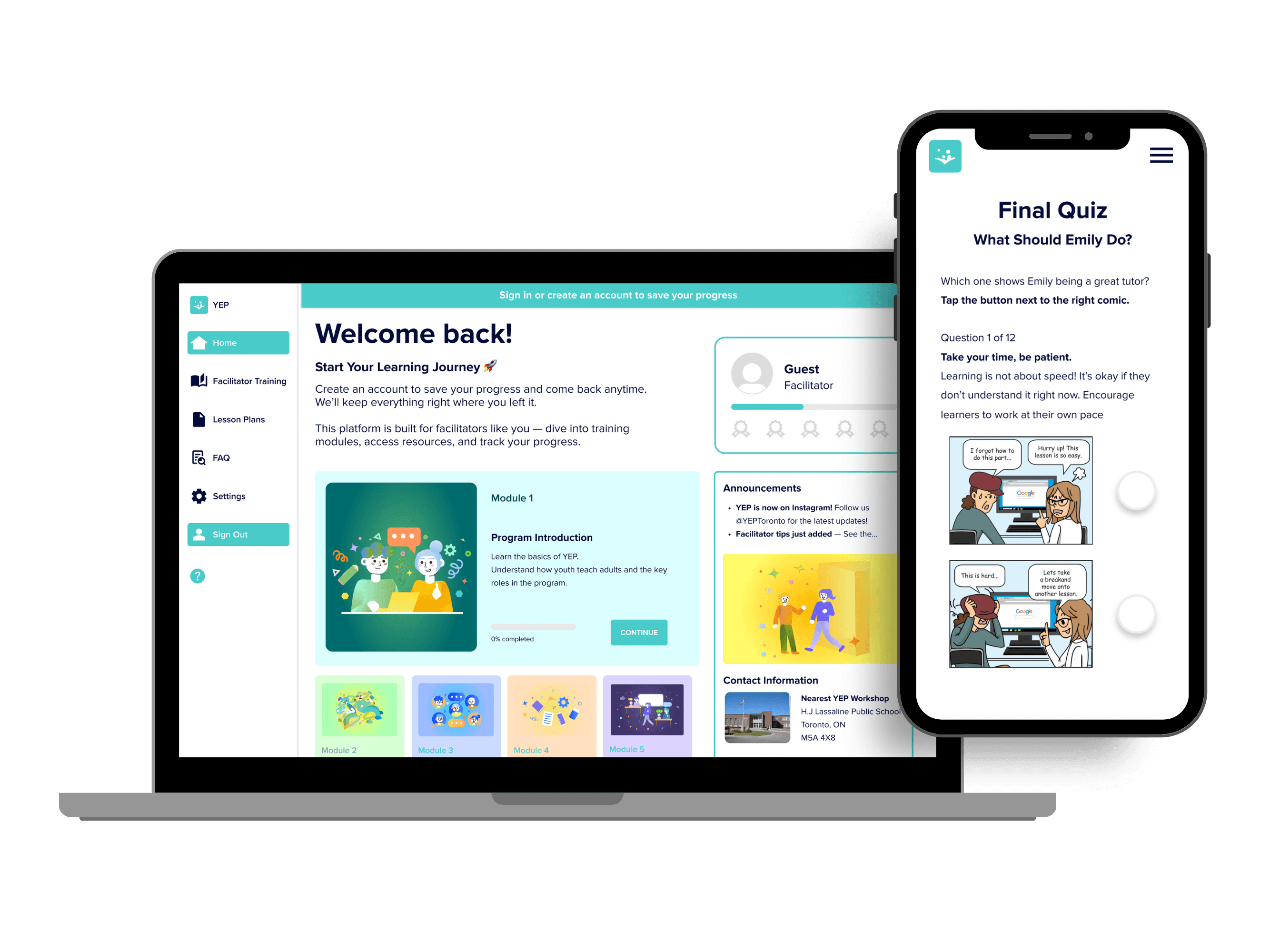
Over six months, I co-led the complete redesign of Youth Empowering Parents' learning platform—a nonprofit that empowers youth to teach digital and life skills to adults, seniors and newcomers in their communities. I transformed an outdated, fragmented system into a modern, mobile-first platform that's intuitive to navigate, simple to maintain, and built to scale.
Over six months, I co-led the complete redesign of Youth Empowering Parents' learning platform—a nonprofit that empowers youth to teach digital and life skills to adults, seniors and newcomers in their communities. I transformed an outdated, fragmented system into a modern, mobile-first platform that's intuitive to navigate, simple to maintain, and built to scale.
ROLE
ROLE
James Ibitoye:
Product Designer & Project
Lead
Collean Chau:
UI Design &
Illustration Lead
James Ibitoye:
Product Designer & Project
Lead
Collean Chau:
UI Design &
Illustration Lead
CLIENT
Youth Empowering Parents
(YEP)
Youth Empowering Parents
(YEP)
PROJECT TYPE
Nonprofit / E-learning
Platform
Nonprofit / E-learning
Platform
DATE / DURATION
January - June 2025
(6 months)
January - June 2025
(6 months)
SERVICES AND SKILLS
UX Strategy
UX Strategy
User Research
User Research
Learning Experience Design
Learning Experience Design
UI Design
UI Design
Prototyping
Prototyping
Project Management
Project Management
Accessibility
Accessibility
Developer Handoff
Developer Handoff
Figma · Miro · Notion
Figma · Miro · Notion
PROBLEM
YEP's training system was split across Moodle and Google Slides — creating a text-heavy, disorganized experience with broken links and zero mobile support. Youth tutors couldn't complete training on their phones, and facilitators wasted workshop time hunting for materials. There was minimal interactivity, clear structure, or a way to track progress.
YEP's training system was split across Moodle and Google Slides — creating a text-heavy, disorganized experience with broken links and zero mobile support. Youth tutors couldn't complete training on their phones, and facilitators wasted workshop time hunting for materials. There was minimal interactivity, clear structure, or a way to track progress.
SOLUTION
I redesigned the experience to be modern, visual, and structured — while ensuring non-technical staff could easily update content.
Modular Learning Paths: Broke learning goals into digestible modules with built-in reflection activities and progress tracking — reducing cognitive load and completion time.
Modern, Responsive UI: Designed for both mobile and desktop, supporting learners on any device.
Role-Based Flows: Created dedicated pathways for youth tutors and workshop facilitators.
Scalable System: Built with repeatable components and styles that could grow over time.
I redesigned the experience to be modern, visual, and structured — while ensuring non-technical staff could easily update content.
Modular Learning Paths: Broke learning goals into digestible modules with built-in reflection activities and progress tracking — reducing cognitive load and completion time.
Modern, Responsive UI: Designed for both mobile and desktop, supporting learners on any device.
Role-Based Flows: Created dedicated pathways for youth tutors and workshop facilitators.
Scalable System: Built with repeatable components and styles that could grow over time.
IMPACT
The redesign is now in active development, with the first coded prototype shared in November 2025. Early user testing showed 100% task completion rates for key workflows — compared to frequent abandonment in the old system. YEP's CEO continues to engage me for QA and design review as the platform scales to serve its international reach.
Feedback from internal stakeholders, facilitators, and youth tutors was overwhelmingly positive - highlighting the improvements in clarity, flow, aesthetics, and mobile usability.
Our work laid the foundation for YEP’s future content expansion and helped make training feel more intuitive and empowering for the volunteers it supports.
The redesign is now in active development, with the first coded prototype shared in November 2025. Early user testing showed 100% task completion rates for key workflows — compared to frequent abandonment in the old system. YEP's CEO continues to engage me for QA and design review as the platform scales to serve its international reach.
Feedback from internal stakeholders, facilitators, and youth tutors was overwhelmingly positive - highlighting the improvements in clarity, flow, aesthetics, and mobile usability.
Our work laid the foundation for YEP’s future content expansion and helped make training feel more intuitive and empowering for the volunteers it supports.
THE CHALLENGE
THE CHALLENGE
01 — The Problem
01 — The Problem
Why the old system was confusing, disconnected, and hard to use.
Why the old system was confusing, disconnected, and hard to use.
The Training Experience Was Overwhelming and Unclear
The Training Experience Was Overwhelming and Unclear
Users struggled to understand where to start, how to progress, and where key content lived.
Users struggled to understand where to start, how to progress, and where key content lived.
Users struggled to understand where to start, how to progress, and where key content lived.
A user browsing through the old platform, digging through drop-downs for resources, encountering broken links, and unstructured content.
Endless Scrolling + Information Overload
Endless Scrolling + Information Overload
Endless Scrolling & Information Overload
Text-heavy content created overload and made learning slow, tiring, and confusing.
Without any hierarchy or pacing, users had to scroll back and forth just to find the information or features they needed.
Text-heavy content created overload and made learning slow, tiring, and confusing.
Without any hierarchy or pacing, users had to scroll back and forth just to find the information or features they needed.
Text-heavy content created overload and made learning slow, tiring, and confusing.
Without any hierarchy or pacing, users had to scroll back and forth just to find the information or features they needed.
Not Mobile Friendly
Not Mobile Friendly
Not Mobile-Friendly
Despite most youth tutors being mobile-first, the platform wasn’t designed for phones.
Broken formatting, missing images, tiny links, and unresponsive layouts made the training nearly impossible to complete on mobile.
Despite most youth tutors being mobile-first, the platform wasn’t designed for phones.
Broken formatting, missing images, tiny links, and unresponsive layouts made the training nearly impossible to complete on mobile.
Despite most youth tutors being mobile-first, the platform wasn’t designed for phones.
Broken formatting, missing images, tiny links, and unresponsive layouts made the training nearly impossible to complete on mobile.
Fragmented Learning Experience
Fragmented Learning Experience
Fragmented Learning Experience
Many elements behaved inconsistently — some links were broken, others opened in new tabs, important modules were hidden inside dropdowns, and there was no progress feedback.
Users didn’t know where they were in the training or what to do next.
Many elements behaved inconsistently — some links were broken, others opened in new tabs, important modules were hidden inside dropdowns, and there was no progress feedback.
Users didn’t know where they were in the training or what to do next.
Many elements behaved inconsistently — some links were broken, others opened in new tabs, important modules were hidden inside dropdowns, and there was no progress feedback.
Users didn’t know where they were in the training or what to do next.
Before the redesign, the learning experience had major issues:
Before the redesign, the learning experience had major issues:
Before the redesign, the learning experience had major issues:
Training content was dumped into one massive page
Facilitators struggled to find anything
Youth found lessons boring, confusing, and weren't completing training
The platform was not mobile-friendly, causing friction
No progress indicators → learners felt “lost”, especially after return sessions
No onboarding system to collect user data for program expansion
Training content was dumped into one massive page
Facilitators struggled to find anything
Youth found lessons boring, confusing, and weren't completing training
The platform was not mobile-friendly, causing friction
No progress indicators → learners felt “lost”, especially after return sessions
No onboarding system to collect user data for program expansion
Training content was dumped into one massive page
Facilitators struggled to find anything
Youth found lessons boring, confusing, and weren't completing training
The platform was not mobile-friendly, causing friction
No progress indicators → learners felt “lost”, especially after return sessions
No onboarding system to collect user data for program expansion
Why It Mattered
Why It Mattered
Why It Mattered:
70% of youth tutors access training on mobile devices (based on our user research with 32 participants), yet the platform was unusable on phones.
Facilitators wasted valuable workshop time searching for lesson plans.
The system was actively hindering the people it was built to support.
70% of youth tutors access training on mobile devices (based on our user research with 32 participants), yet the platform was unusable on phones.
Facilitators wasted valuable workshop time searching for lesson plans.
The system was actively hindering the people it was built to support.
70% of youth tutors access training on mobile devices (based on our user research with 32 participants), yet the platform was unusable on phones.
Facilitators wasted valuable workshop time searching for lesson plans.
The system was actively hindering the people it was built to support.
DISCOVERY
DISCOVERY
02 — Research & Users
02 — Research & Users
What youth tutors and facilitators told us — and what we observed.
What youth tutors and facilitators told us — and what we observed.
User Groups
User Groups
User Groups
We conducted research with YEP’s two core audiences:
We conducted research with YEP’s two core audiences:




Youth Tutors
Youth Tutors
• Mobile-first
• Prefer quick, interactive learning
• Motivated by feedback, rewards, and progress
• Found text-heavy lessons boring and “too much”
• Mobile-first
• Prefer quick, interactive learning
• Motivated by feedback, rewards, and progress
• Found text-heavy lessons boring and “too much”


Facilitators & Staff
Facilitators & Staff
• Not always tech-confident
• Need clear navigation and consistent formatting
• Want modules broken into predictable, easy-to-find sections
• Not always tech-confident
• Need clear navigation and consistent formatting
• Want modules broken into predictable, easy-to-find sections
Research Methods
Research Methods
Research Methods
• Full platform audit
• Stakeholder & facilitator interviews (Alastair & Iftekhar)
• In-person youth interviews
• Workshop observation to see the program in action
• Maze tests with remote participants
• Synthesized interview insights into informal personas that guided design
• Full platform audit
• Stakeholder & facilitator interviews (Alastair & Iftekhar)
• In-person youth interviews
• Workshop observation to see the program in action
• Maze tests with remote participants
• Synthesized interview insights into informal personas that guided design
• Full platform audit
• Stakeholder & facilitator interviews (Alastair & Iftekhar)
• In-person youth interviews
• Workshop observation to see the program in action
• Maze tests with remote participants
• Synthesized interview insights into informal personas that guided design
Key Insights That Shaped the Design
Key Insights That Shaped the Design
Key Insights That Shaped the Design
• Navigation was the biggest barrier
• Youth needed engagement, not paragraphs
• Facilitators needed clarity and efficiency
• Progress tracking drove motivation
• Mobile-first design was essential
• Activities needed to be simple to develop & scalable
• Navigation was the biggest barrier
• Youth needed engagement, not paragraphs
• Facilitators needed clarity and efficiency
• Progress tracking drove motivation
• Mobile-first design was essential
• Activities needed to be simple to develop & scalable
• Navigation was the biggest barrier
• Youth needed engagement, not paragraphs
• Facilitators needed clarity and efficiency
• Progress tracking drove motivation
• Mobile-first design was essential
• Activities needed to be simple to develop & scalable
Early Design Artifacts
Early Design Artifacts
A look at some of the user journeys, sitemaps, and mockups that guided our early designs.

Sitemap
Sitemap
Sitemap
I audited the existing content and user needs to design a clear information architecture - organizing pages and features around actual user workflows rather than technical constraints.
I audited the existing content and user needs to design a clear information architecture - organizing pages and features around actual user workflows rather than technical constraints.
I audited the existing content and user needs to design a clear information architecture - organizing pages and features around actual user workflows rather than technical constraints.

User Journeys
User Journeys
I mapped current user journeys for key tasks, then designed new flows that reduced friction and aligned with how youth and facilitators actually work.
I mapped current user journeys for key tasks, then designed new flows that reduced friction and aligned with how youth and facilitators actually work.
I mapped current user journeys for key tasks, then designed new flows that reduced friction and aligned with how youth and facilitators actually work.
Wireframes
Wireframes
Wireframes
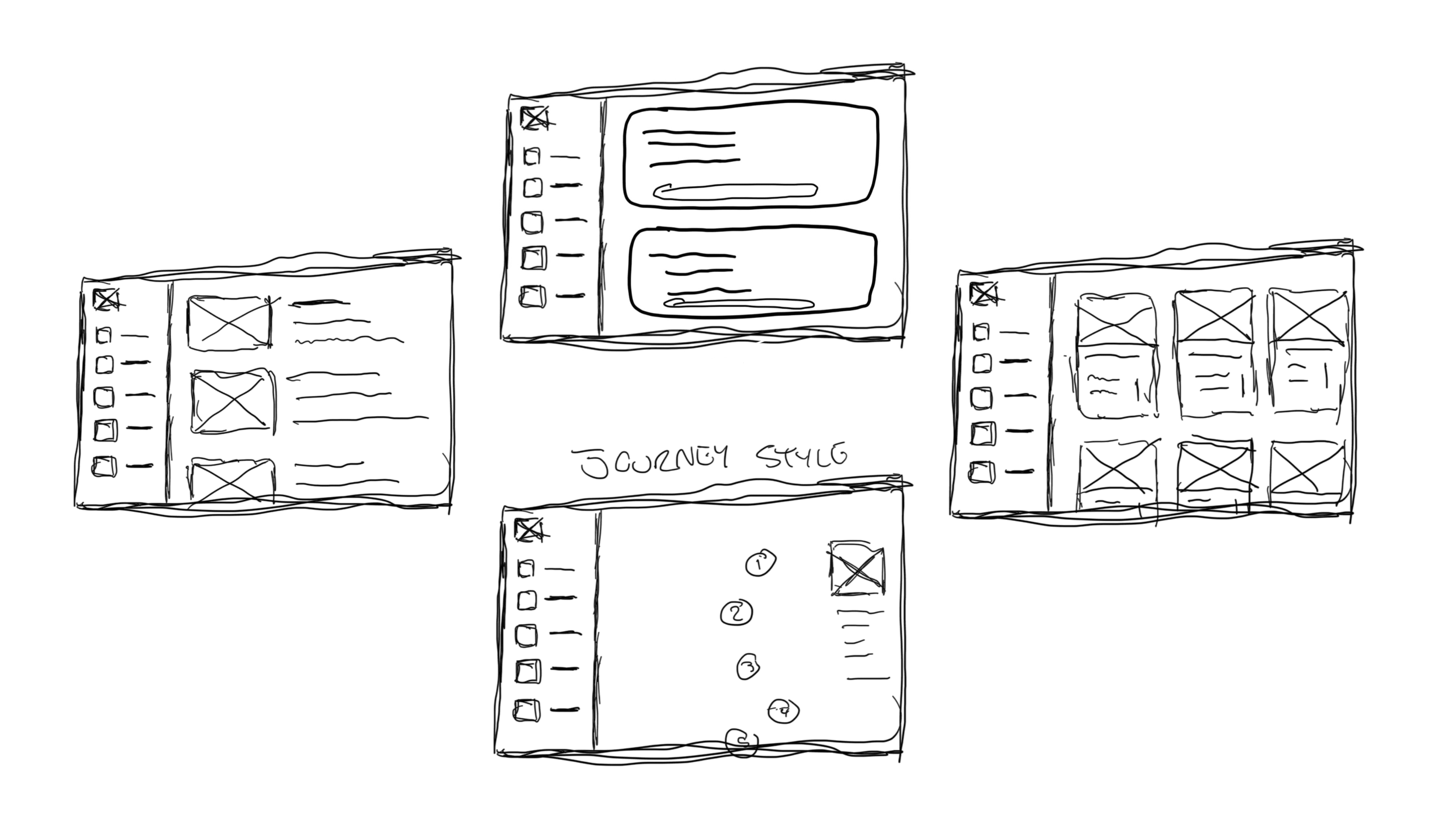
We rapidly sketched user journey steps to explore solutions, then created wireframes to test and iterate on the strongest concepts.
We rapidly sketched user journey steps to explore solutions, then created wireframes to test and iterate on the strongest concepts.
We rapidly sketched user journey steps to explore solutions, then created wireframes to test and iterate on the strongest concepts.
Early Design Artifacts
A look at some of the user journeys, sitemaps, and mockups that guided our early designs
STRUCTURE
STRUCTURE
03 — Information Architecture & Navigation
03 — Information Architecture & Navigation
Transforming one long scroll into a clear, organized, goal-driven platform.
Transforming one long scroll into a clear, organized, goal-driven platform.
From One Endless Page → A Structured, Goal-Oriented Platform
The most impactful improvement was rebuilding the entire information architecture — transforming how users navigate, learn, and complete training.
The old version forced users to scroll through a massive page packed with text, images, and headers to find what they needed. Both youth and facilitators described the experience as confusing, tiring, and easy to get lost in.
The most impactful improvement was rebuilding the entire information architecture — transforming how users navigate, learn, and complete training.
The old version forced users to scroll through a massive page packed with text, images, and headers to find what they needed. Both youth and facilitators described the experience as confusing, tiring, and easy to get lost in.
The Problem (Before)
The Problem (Before)
Everything lived on one page → constant scrolling and skimming
No clear separation between modules, resources, or settings
Key actions (sign in, log out, settings) were only available at the very top
Facilitators couldn’t quickly access materials during live workshops
No “sense of place” → users didn’t know where they were in the learning journey
Everything lived on one page → constant scrolling and skimming
No clear separation between modules, resources, or settings
Key actions (sign in, log out, settings) were only available at the very top
Facilitators couldn’t quickly access materials during live workshops
No “sense of place” → users didn’t know where they were in the learning journey
Solution:
Rebuilding the IA Around User Goals
Solution:
Rebuilding the IA Around User Goals
1. A New Information Architecture
1. A New Information Architecture
I reorganized the entire platform into clear, predictable sections that match real user needs:
• Home
• Courses (Modules + Progress)
• Lesson Plans / Resources
• FAQ (formerly Glossary)
• Profile & Settings
This shift removed cognitive overload and replaced chaos with a clean mental model.
I reorganized the entire platform into clear, predictable sections that match real user needs:
• Home
• Courses (Modules + Progress)
• Lesson Plans / Resources
• FAQ (formerly Glossary)
• Profile & Settings
This shift removed cognitive overload and replaced chaos with a clean mental model.
2. Persistent Left Navigation
2. Persistent Left Navigation
A collapsible left sidebar now anchors the experience across all pages.
This gives users:
• Instant access to modules, resources, and tools
• A stable orientation point (no more hunting or scrolling)
• A consistent layout that works on both desktop and mobile
• Faster use during live workshops for facilitators
This transformed YEP’s e-learning from something users tolerated → to something they could actually navigate with confidence.
A collapsible left sidebar now anchors the experience across all pages.
This gives users:
• Instant access to modules, resources, and tools
• A stable orientation point (no more hunting or scrolling)
• A consistent layout that works on both desktop and mobile
• Faster use during live workshops for facilitators
This transformed YEP’s e-learning from something users tolerated → to something they could actually navigate with confidence.
Impact
Impact
• Users no longer get lost in long scrolls
• Facilitators can find lesson resources instantly during workshops
• Clear structure reduces cognitive load
• The platform now aligns with the actual workflows of youth and facilitators
• The new IA sets a foundation for future scalability
• Users no longer get lost in long scrolls
• Facilitators can find lesson resources instantly during workshops
• Clear structure reduces cognitive load
• The platform now aligns with the actual workflows of youth and facilitators
• The new IA sets a foundation for future scalability
Before:
Before:
The original single-page design forced endless scrolling through walls of text. Users had no sense of progress or location — leading to frustration and abandonment.
The original single-page design forced endless scrolling through walls of text. Users had no sense of progress or location — leading to frustration and abandonment.
After:
After:
Persistent left navigation provides instant access to all sections. Users always know where they are and can jump between modules without scrolling. An onboarding tutorial introduces the navigation structure on first login.
Persistent left navigation provides instant access to all sections. Users always know where they are and can jump between modules without scrolling. An onboarding tutorial introduces the navigation structure on first login.
From One Endless Page → A Structured, Goal-Oriented Platform
The most impactful improvement was rebuilding the entire information architecture — transforming how users navigate, learn, and complete training.
The old version forced users to scroll through a massive page packed with text, images, and headers to find what they needed. Both youth and facilitators described the experience as confusing, tiring, and easy to get lost in.
The Problem (Before)
Everything lived on one page → constant scrolling and skimming
No clear separation between modules, resources, or settings
Key actions (sign in, log out, settings) were only available at the very top
Facilitators couldn’t quickly access materials during live workshops
No “sense of place” → users didn’t know where they were in the learning journey
Solution:
Rebuilding the IA Around User Goals
1. A New Information Architecture
I reorganized the entire platform into clear, predictable sections that match real user needs:
• Home
• Courses (Modules + Progress)
• Lesson Plans / Resources
• FAQ (formerly Glossary)
• Profile & Settings
This shift removed cognitive overload and replaced chaos with a clean mental model.
2. Persistent Left Navigation
A collapsible left sidebar now anchors the experience across all pages.
This gives users:
• Instant access to modules, resources, and tools
• A stable orientation point (no more hunting or scrolling)
• A consistent layout that works on both desktop and mobile
• Faster use during live workshops for facilitators
This transformed YEP’s e-learning from something users tolerated → to something they could actually navigate with confidence.
Impact
• Users no longer get lost in long scrolls
• Facilitators can find lesson resources instantly during workshops
• Clear structure reduces cognitive load
• The platform now aligns with the actual workflows of youth and facilitators
• The new IA sets a foundation for future scalability
Before:
The original single-page design forced endless scrolling through walls of text. Users had no sense of progress or location — leading to frustration and abandonment.
After:
Persistent left navigation provides instant access to all sections. Users always know where they are and can jump between modules without scrolling. An onboarding tutorial introduces the navigation structure on first login.
UX & UI DESIGN
UX & UI DESIGN
04 — Design & Interaction Patterns
04 — Design & Interaction Patterns
Building an engaging, accessible, mobile-ready learning experience.
Building an engaging, accessible, mobile-ready learning experience.
Design & Visual Solutions
Design & Visual Solutions
Design & Visual Solutions
Translating research insights into an intuitive, mobile-first learning experience.
Translating our research insights into an intuitive, mobile-first learning experience.
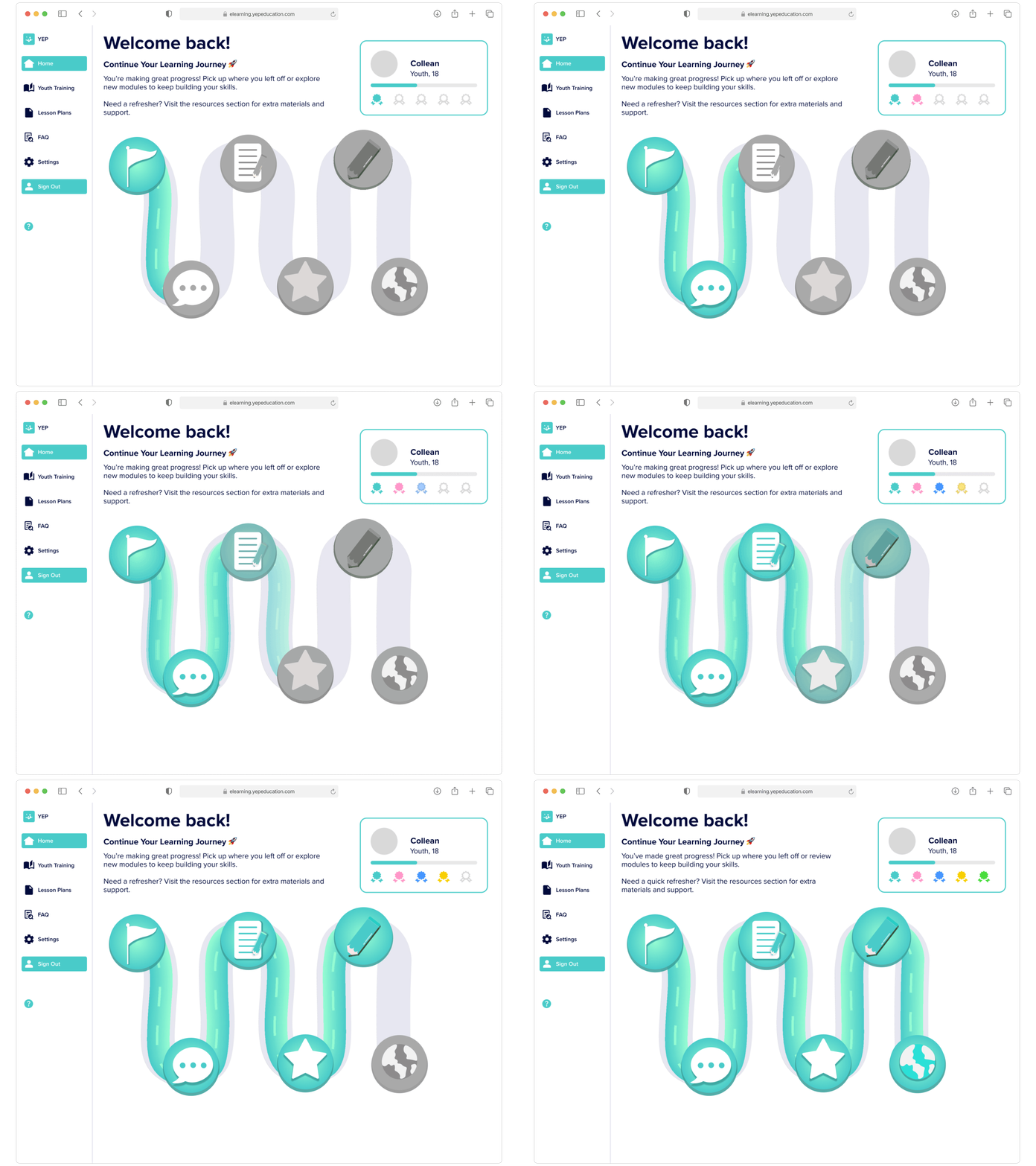
Our new design for the Youth homepage, with a Duolingo-style "roadmap" with nodes to visualize their progress.
Our new design for the Youth homepage, with a Duolingo-style "roadmap" with nodes to visualize their progress.
Designing for Engagement
Designing for Engagement
Designing for Engagement
How we solved one of the core problems of keeping users engaged, and aware of their goals & progress.
How we solved one of the core problems of keeping users engaged, and aware of their goals & progress.
How we solved one of the core problems of keeping users engaged, and aware of their goals & progress.

Youth Progression: "Duolingo" Style Map
Youth Progression: "Duolingo" Style Map
Youth Progression: "Duolingo" Style Map
Map-style layout shows clear start-to-finish flow with progress indicators and gamified badges — replacing the endless scroll where users had no sense of location or completion.
This design was inspired by the progression maps found in Duolingo and games like Super Mario, making it more intuitive & familiar for the youth users.
Map-style layout shows a clear start-to-finish flow with progress indicators and gamified badges — replacing the endless scroll where users had no sense of location or completion.
Inspired by the progression maps found in Duolingo and games like Super Mario, making it more intuitive & familiar for the youth users.
Map-style layout shows clear start-to-finish flow with progress indicators and gamified badges — replacing the endless scroll where users had no sense of location or completion.
This design was inspired by the progression maps found in Duolingo and games like Super Mario, making it more intuitive & familiar for the youth users.
Facilitator Progression:
"Rotating Cards" Dashboard
Facilitator Progression:
"Rotating Cards" Dashboard
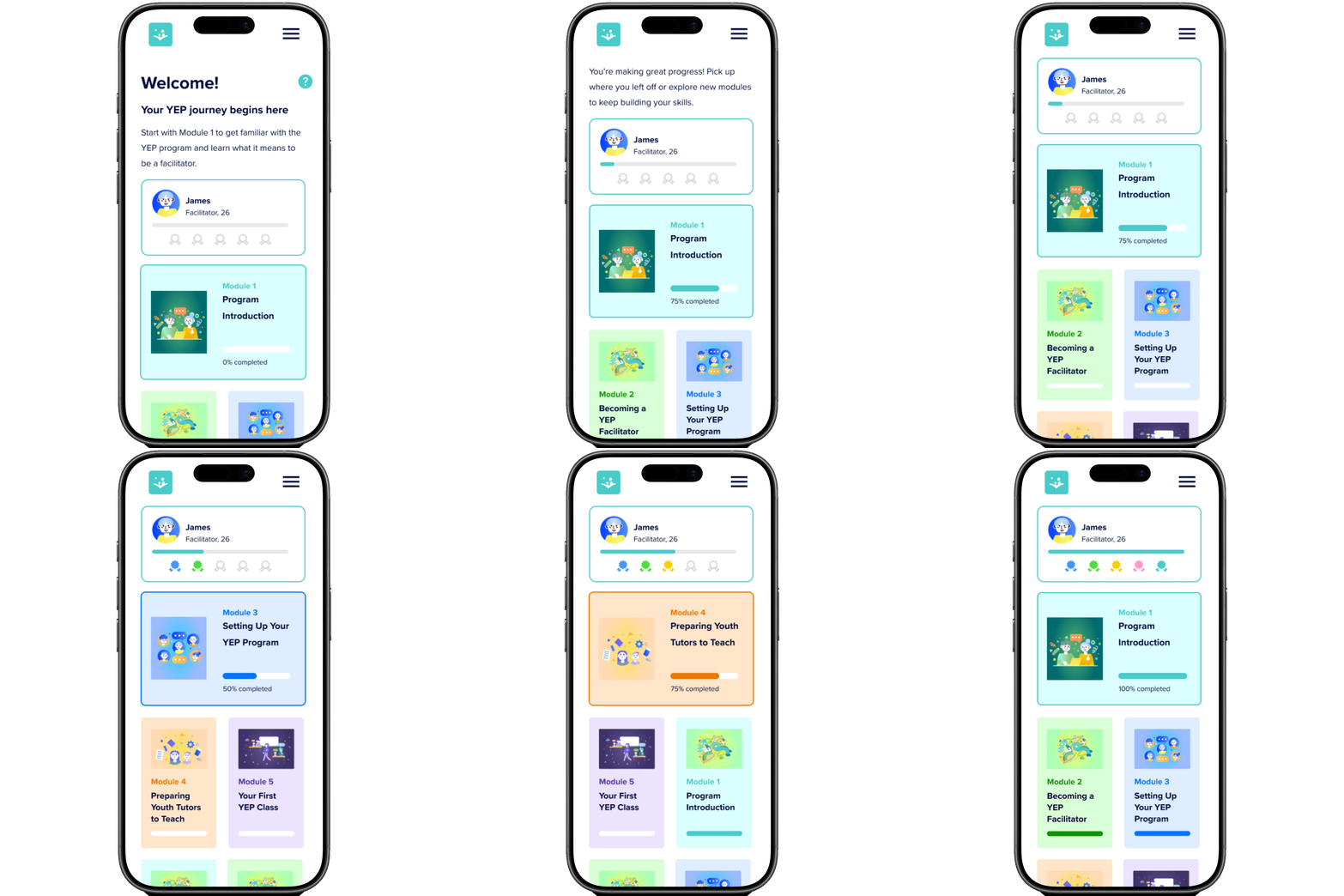
Module cards automatically organize themselves as the user makes progress, highlighting the current module at the top.
Progress bars and badges provide instant visual feedback — letting facilitators jump right back to where they left off.
Module cards automatically organize themselves as the user makes progress, highlighting the current module at the top.
Progress bars and badges provide instant visual feedback — letting facilitators jump right back to where they left off.
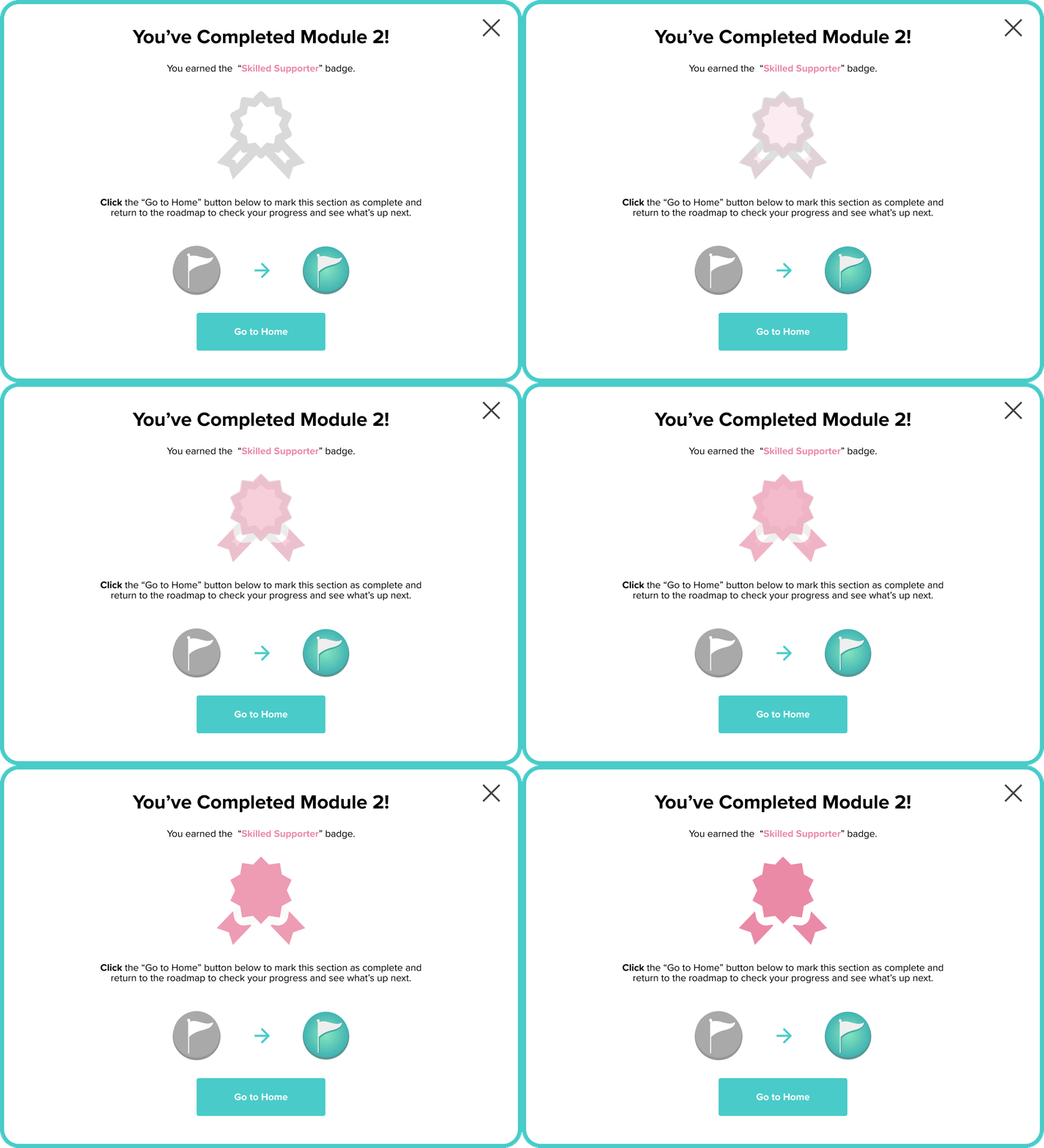

Module Completion: Instant Achievement Feedback
Module Completion: Instant Achievement Feedback
Badge animations and achievement messages provide immediate recognition upon completing modules.
Clear next-step prompts keep momentum going.
Optimized for both desktop and mobile contexts.
Badge animations and achievement messages provide immediate recognition upon completing modules.
Clear next-step prompts keep momentum going.
Optimized for both desktop and mobile contexts.


Badge Collecting Gamification
Badge Collecting Gamification
Profile badge display with progress bars and locked achievements creates ongoing motivation.
Directly addresses research finding that youth are 'motivated by feedback, rewards, and progress.
Profile badge display with progress bars and locked achievements creates ongoing motivation.
Directly addresses research finding that youth are 'motivated by feedback, rewards, and progress.

Desktop Activities:
Comic-Based Scenarios
Desktop Activities:
Comic-Based Scenarios
Interactive quiz activities use comic-style scenarios to make learning engaging. Clear question prompts with visual context help tutors understand real-world situations they'll encounter.
Interactive quiz activities use comic-style scenarios to make learning engaging.
Clear question prompts with visual context help tutors understand real-world situations they'll encounter.

Mobile-Optimized Activities
Mobile-Optimized Activities
All activities are fully responsive with touch-friendly buttons, readable text sizing, and optimized layouts—ensuring youth tutors can complete training seamlessly on their phones.
All activities are fully responsive with touch-friendly buttons, readable text sizing, and optimized layouts—ensuring youth tutors can complete training seamlessly on their phones.
Solving User Pain Points & Business Goals
Solving User Pain Points & Business Goals
Three critical problems we solved through thoughtful UI and interaction design.
Three critical problems we solved through thoughtful UI and interaction design.
PROBLEM
PROBLEM
PROBLEM
Accessing Lesson Plans
Accessing Lesson Plans
Accessing Lesson Plans
Youth and Facilitators groups both complained about having to navigate and scroll around the site to find lesson plans, reporting some links being broken as well.
Youth and Facilitators groups both complained about having to navigate and scroll around the site to find lesson plans, reporting some links being broken as well.
SOLUTION
SOLUTION
SOLUTION
"Lessons" Tab for Accessibility & Efficiency
"Lessons" Tab for Accessibility & Efficiency
"Lessons" Tab for Accessibility & Efficiency
I added a dedicated 'Lessons' tab to the persistent navigation, making all lesson plans accessible from any page.
Users can search, browse by topic, and preview documents in-app before downloading—eliminating broken links and reducing clicks from 5+ to 2.
I added a dedicated 'Lessons' tab to the persistent navigation, making all lesson plans accessible from any page.
Users can search, browse by topic, and preview documents in-app before downloading—eliminating broken links and reducing clicks from 5+ to 2.
PROBLEM
PROBLEM
PROBLEM
Getting Started
Getting Started
Getting Started
New users had no guidance on how to navigate the platform or where to find key features.
This led to confusion, wasted time, and support requests from users who couldn't orient themselves.
New users had no guidance on how to navigate the platform or where to find key features.
This led to confusion, wasted time, and support requests from users who couldn't orient themselves.
SOLUTION
SOLUTION
SOLUTION
Onboarding Tutorial
Onboarding Tutorial
Onboarding Tutorial
I designed an interactive onboarding tutorial that guides new users through the platform's navigation, key features, and learning workflow.
Users complete a quick walkthrough on first login, reducing initial confusion and support requests. It can be replayed at any time through the navbar's (?) button.
I designed an interactive onboarding tutorial that guides new users through the platform's navigation, key features, and learning workflow.
Users complete a quick walkthrough on first login, reducing initial confusion and support requests. It can be replayed at any time through the navbar's (?) button.
PROBLEM
PROBLEM
PROBLEM
Learner Engagement
Learner Engagement
Learner Engagement
Youth tutors and facilitators described lessons as 'boring' and 'too much text.'
The lack of interactivity led to low engagement and poor completion rates — undermining the program's effectiveness.
Youth tutors and facilitators described lessons as 'boring' and 'too much text.'
The lack of interactivity led to low engagement and poor completion rates — undermining the program's effectiveness.
SOLUTION
SOLUTION
SOLUTION
Interactive Activities
Interactive Activities
Interactive Activities
I redesigned learning modules to include interactive activities (quizzes, matching games, scenario-based exercises) that break up text and provide immediate feedback.
This increased engagement and made complex concepts more digestible.
I redesigned learning modules to include interactive activities (quizzes, matching games, scenario-based exercises) that break up text and provide immediate feedback.
This increased engagement and made complex concepts more digestible.
Design System & Visual Language
Design System & Visual Language
We built the design system on Material Design principles as the foundation, infused with YEP's existing brand identity and educational context.
We built the design system on Material Design principles as the foundation, infused with YEP's existing brand identity and educational context.
Why Material Design?
Why Material Design?
1. Minimal by Design
YEP's existing brand favoured clean, simple aesthetics. Material Design's structured approach aligned with this while providing proven usability patterns.
2. Room for Educational Content
Knowing the modules would be filled with colorful comics, videos, and graphics, we kept the UI intentionally restrained—letting the educational content be the star without visual competition.
3. Proven Foundation
Rather than reinventing interaction patterns, we leveraged Material's tested components and accessibility standards—saving development time while ensuring a familiar, intuitive experience.
4. Youthful Energy, Professional Execution
We infused YEP's teal brand color and playful illustrations throughout, adding personality while maintaining clarity and focus on learning outcomes."
1. Minimal by Design
YEP's existing brand favoured clean, simple aesthetics. Material Design's structured approach aligned with this while providing proven usability patterns.
2. Room for Educational Content
Knowing the modules would be filled with colorful comics, videos, and graphics, we kept the UI intentionally restrained—letting the educational content be the star without visual competition.
3. Proven Foundation
Rather than reinventing interaction patterns, we leveraged Material's tested components and accessibility standards—saving development time while ensuring a familiar, intuitive experience.
4. Youthful Energy, Professional Execution
We infused YEP's teal brand color and playful illustrations throughout, adding personality while maintaining clarity and focus on learning outcomes."
Color Palettes & Typography
Color Palettes & Typography
We based our designs on YEP's existing brand guidelines. For the palette we used YEP's teal and navy for dominant/primary features, supported by neutral grey, white and black tones for secondary elements.
The main typeface was "Proxima Nova", with "Gibson" for body type.
We based our designs on YEP's existing brand guidelines. For the palette we used YEP's teal and navy for dominant/primary features, supported by neutral grey, white and black tones for secondary elements.
The main typeface was "Proxima Nova", with "Gibson" for body type.

Yep's color palette — teal and navy for dominant/primary features, supported by neutral grey, white and black tones for secondary elements.
Yep's color palette — teal and navy for dominant/primary features, supported by neutral grey, white and black tones for secondary elements.

YEP's brand guidelines for their main website.
YEP's brand guidelines for their main website.
USABILITY TESTING
USABILITY TESTING
05 — Testing & Iteration
05 — Testing & Iteration
Validating ideas and improving flows through real user feedback.
Validating ideas and improving flows through real user feedback.
Continuous Testing Across All Sprints
Continuous Testing Across All Sprints
We ran 3 rounds of usability testing after each major sprint using a mix of Maze remote testing and in-person sessions at YEP workshops.
In total, we tested with 32 users, including:
• 20+ youth volunteers
• 8 facilitators
• 6 YEP educational staff
This allowed us to validate user flows, uncover friction points early, and continuously improve the learning experience.
We ran 3 rounds of usability testing after each major sprint using a mix of Maze remote testing and in-person sessions at YEP workshops.
In total, we tested with 32 users, including:
• 20+ youth volunteers
• 8 facilitators
• 6 YEP educational staff
This allowed us to validate user flows, uncover friction points early, and continuously improve the learning experience.
Youth Tutors
Youth Tutors
• Mobile-first
• Prefer quick, interactive learning
• Motivated by feedback, rewards, and progress
• Found text-heavy lessons boring and “too much”
• Mobile-first
• Prefer quick, interactive learning
• Motivated by feedback, rewards, and progress
• Found text-heavy lessons boring and “too much”
• Mobile-first
• Prefer quick, interactive learning
• Motivated by feedback, rewards, and progress
• Found text-heavy lessons boring and “too much”
Facilitators & Staff
Facilitators & Staff
• Not always tech-confident
• Need clear navigation and consistent formatting
• Want modules broken into predictable, easy-to-find sections
• Not always tech-confident
• Need clear navigation and consistent formatting
• Want modules broken into predictable, easy-to-find sections
• Not always tech-confident
• Need clear navigation and consistent formatting
• Want modules broken into predictable, easy-to-find sections
Testing Methods
Testing Methods
Why Maze.co?
Why Maze.co?
To make our testing accessible, reach users quickly and gather high-quality insights, we used Maze to:
Capture click heatmaps
Track misclicks and different paths taken to complete tasks
Record audio/video reactions during tasks
Collect both qualitative and quantitative feedback
Generate AI follow-up questions to understand the why & how behind their responses
Standardize tasks across multiple user groups
To make our testing accessible, reach users quickly and gather high-quality insights, we used Maze to:
Capture click heatmaps
Track misclicks and different paths taken to complete tasks
Record audio/video reactions during tasks
Collect both qualitative and quantitative feedback
Generate AI follow-up questions to understand the why & how behind their responses
Standardize tasks across multiple user groups
Why In-Person (Observational) Testing?
Why In-Person (Observational) Testing?
Testing prototypes directly with youth volunteers at after-school workshops helped us:
Observe real mobile usage in their natural environment
Prompt quieter youth to share deeper feedback;
Test mobile ergonomics across different devices
Understand real-world teaching context and cognitive load
Testing prototypes directly with youth volunteers at after-school workshops helped us:
Observe real mobile usage in their natural environment
Prompt quieter youth to share deeper feedback;
Test mobile ergonomics across different devices
Understand real-world teaching context and cognitive load
Maze let us test complex interactions at scale, even when in-person testing wasn’t feasible.
Maze let us test complex interactions at scale, even when in-person testing wasn’t feasible.
In-person testing gave us contextual insights we couldn’t capture remotely.
In-person testing gave us contextual insights we couldn’t capture remotely.
Across Maze and in-person tests, we observed consistent patterns in how youth interacted with mobile layouts and how facilitators navigated modules.
These patterns directly shaped our redesign decisions.
Across Maze and in-person tests, we observed consistent patterns in how youth interacted with mobile layouts and how facilitators navigated modules.
These patterns directly shaped our redesign decisions.
Precise Testing Data
A look at some of the patterns, behaviours and friction points we discovered across 32 testers.
Precise Testing Data
A look at some of the patterns, behaviors, and friction points we discovered across 32 testers.
Heatmaps
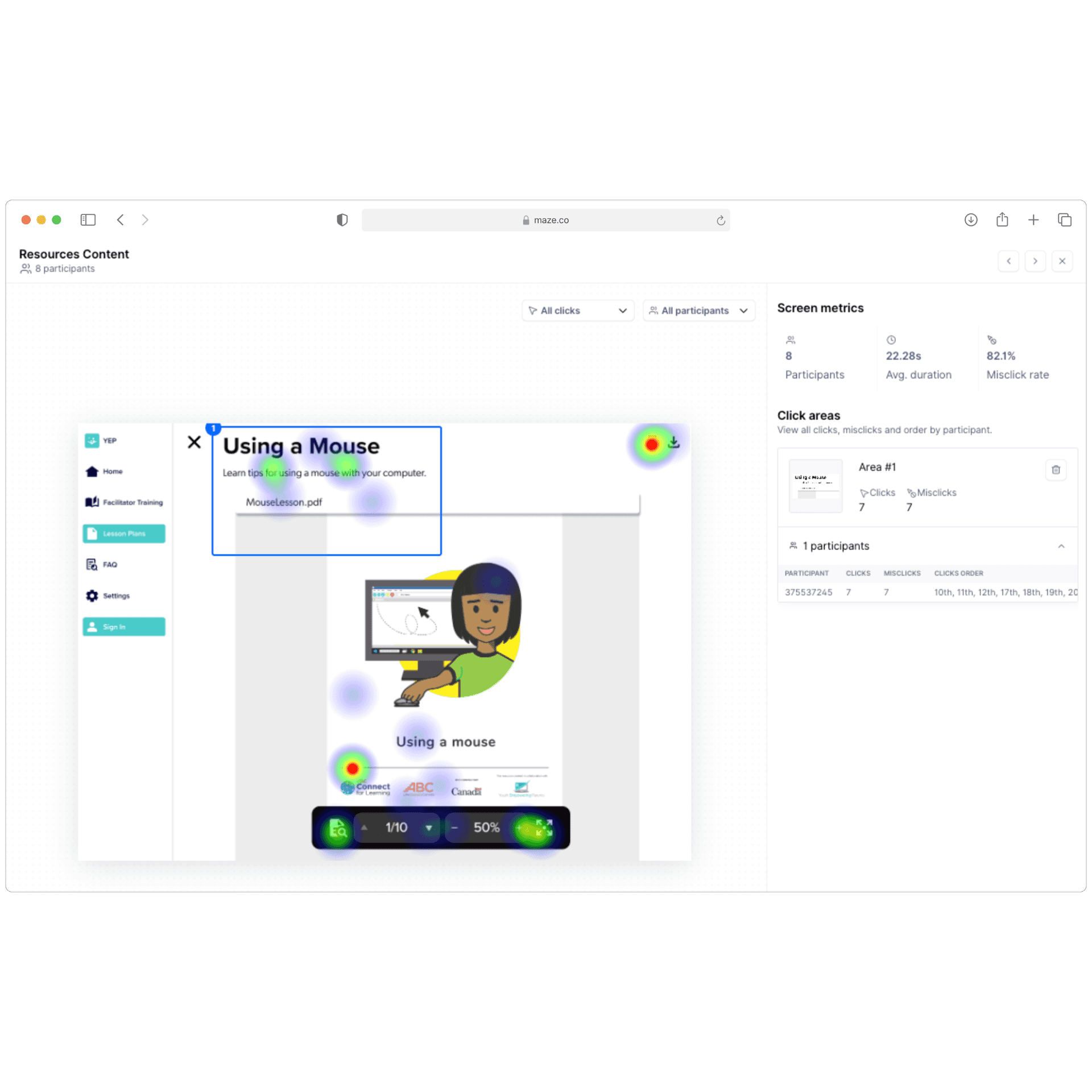
Heatmaps
Heatmaps helped us observe real user behavior around downloading lesson materials.
Most users tapped the correct download icon immediately, but a few hesitated or tapped non-interactive elements (title, surrounding whitespace).
This revealed opportunities to:
tighten spacing
improve tap targets
make the download action more visually distinct
Overall, heatmaps helped confirm where interactions were working and where clarity could be improved.
Heatmaps helped us observe real user behavior around downloading lesson materials.
Most users tapped the correct download icon immediately, but a few hesitated or tapped non-interactive elements (title, surrounding whitespace).
This revealed opportunities to:
tighten spacing
improve tap targets
make the download action more visually distinct
Overall, heatmaps helped confirm where interactions were working and where clarity could be improved.
Heatmaps helped us observe real user behavior around downloading lesson materials.
Most users tapped the correct download icon immediately, but a few hesitated or tapped non-interactive elements (title, surrounding whitespace).
This revealed opportunities to:
Tighten spacing
Improve tap targets
Make the download action more visually distinct
Overall, heatmaps helped confirm where interactions were working and where clarity could be improved.

Task Completion Summary
Task Completion Summary
100% of users successfully completed the task of finding and printing a lesson plan.
The multiple paths users took highlighted different mental models:
Some navigated through the left sidebar
Others scanned the page content directly
A few relied on search patterns
This reinforced the value of having redundant, intuitive entry points to the same task — especially in a multi-user platform with varying levels of tech confidence.
100% of users successfully completed the task of finding and printing a lesson plan.
The multiple paths users took highlighted different mental models:
Some navigated through the left sidebar
Others scanned the page content directly
A few relied on search patterns
This reinforced the value of having redundant, intuitive entry points to the same task — especially in a multi-user platform with varying levels of tech confidence.
Misclick Rates & Navigation Friction
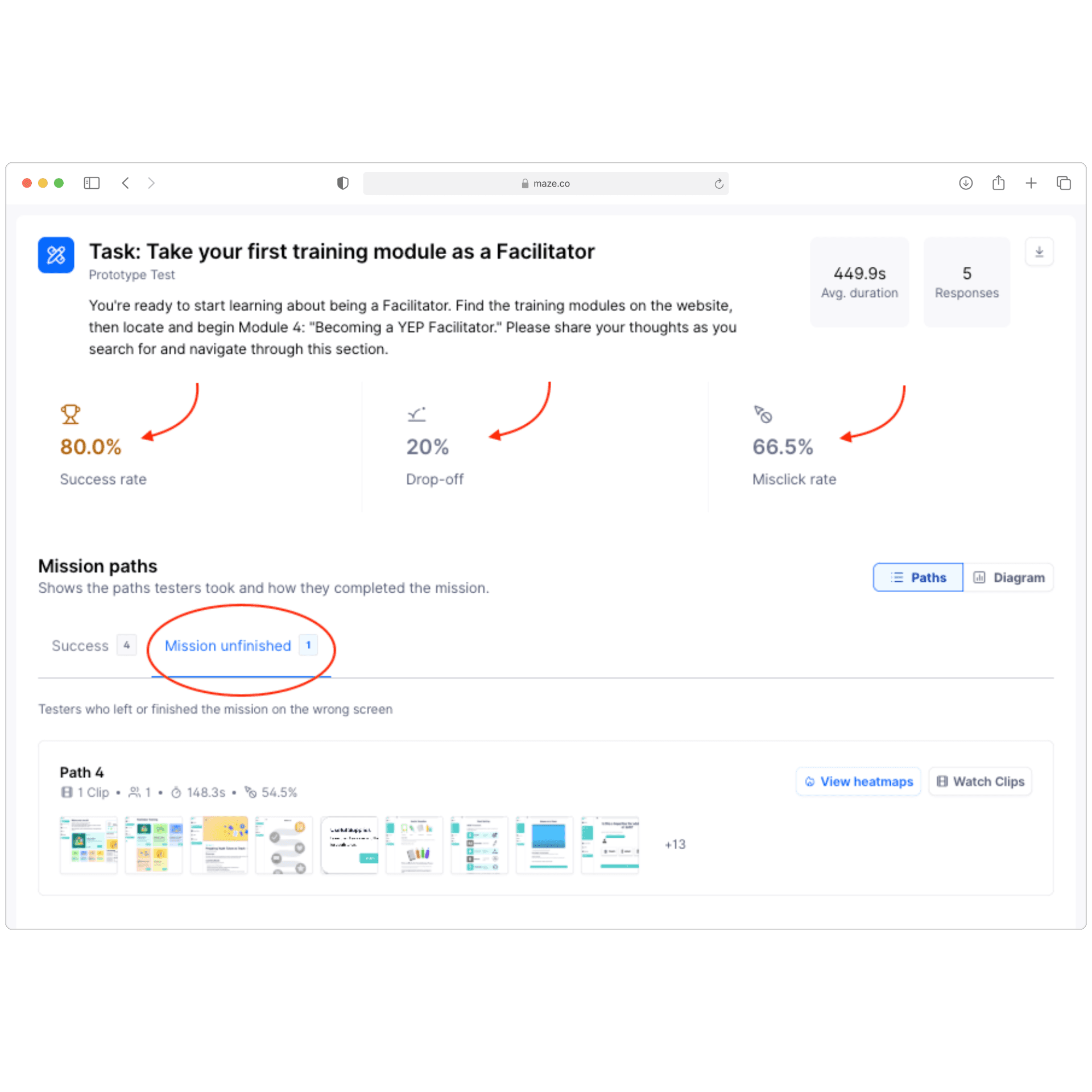
Misclick Rates & Navigation Friction
A high misclick rate on one task revealed where layout and hierarchy caused uncertainty.
Most users completed the flow successfully — but one user failed to finish, and overall misclicks were high for this screen.
Importantly, many “misclicks” were users exploring features or tapping nearby elements, which helped us understand:
where spacing was too tight
which elements looked “interactive” when they weren’t
how certain screens created cognitive overload
This informed refinements to spacing, button hierarchy, and module structure.
A high misclick rate on one task revealed where layout and hierarchy caused uncertainty.
Most users completed the flow successfully — but one user failed to finish, and overall misclicks were high for this screen.
Importantly, many “misclicks” were users exploring features or tapping nearby elements, which helped us understand:
where spacing was too tight
which elements looked “interactive” when they weren’t
how certain screens created cognitive overload
This informed refinements to spacing, button hierarchy, and module structure.
Key Usability Findings
Key Usability Findings
Mobile-first layouts needed significantly more spacing and clearer tappable zones
Drag-based activities caused friction → users struggled on small screens
Youth responded strongly to comic-based scenarios + instant feedback
Facilitators needed clearer hierarchy, collapsible sections, and more predictable navigation
Buttons placed too low on the screen caused hesitation and misclicks
Inconsistent link behaviour (new tabs, broken links) increased confusion
Users wanted easier access to lesson plans during workshops
Youth expected reward-like progress indicators and simple quiz flows
Mobile-first layouts needed significantly more spacing and clearer tappable zones
Drag-based activities caused friction → users struggled on small screens
Youth responded strongly to comic-based scenarios + instant feedback
Facilitators needed clearer hierarchy, collapsible sections, and more predictable navigation
Buttons placed too low on the screen caused hesitation and misclicks
Inconsistent link behaviour (new tabs, broken links) increased confusion
Users wanted easier access to lesson plans during workshops
Youth expected reward-like progress indicators and simple quiz flows
How We Iterated
How We Iterated
Redesigned 3 activities (Multiple Choice Quiz, Do’s & Don’ts, Pairing) to solve usability issues discovered after testing our prototypes
Adjusted spacing & interaction patterns for mobile ergonomics
Improved onboarding flow based on Maze completion patterns
Reorganized IA after facilitator feedback
Refined educational content for clarity
Presented weekly changes to stakeholders for feedback
Redesigned 3 activities (Multiple Choice Quiz, Do’s & Don’ts, Pairing) to solve usability issues discovered after testing our prototypes
Adjusted spacing & interaction patterns for mobile ergonomics
Improved onboarding flow based on Maze completion patterns
Reorganized IA after facilitator feedback
Refined educational content for clarity
Presented weekly changes to stakeholders for feedback
First Design: Drag and Drop
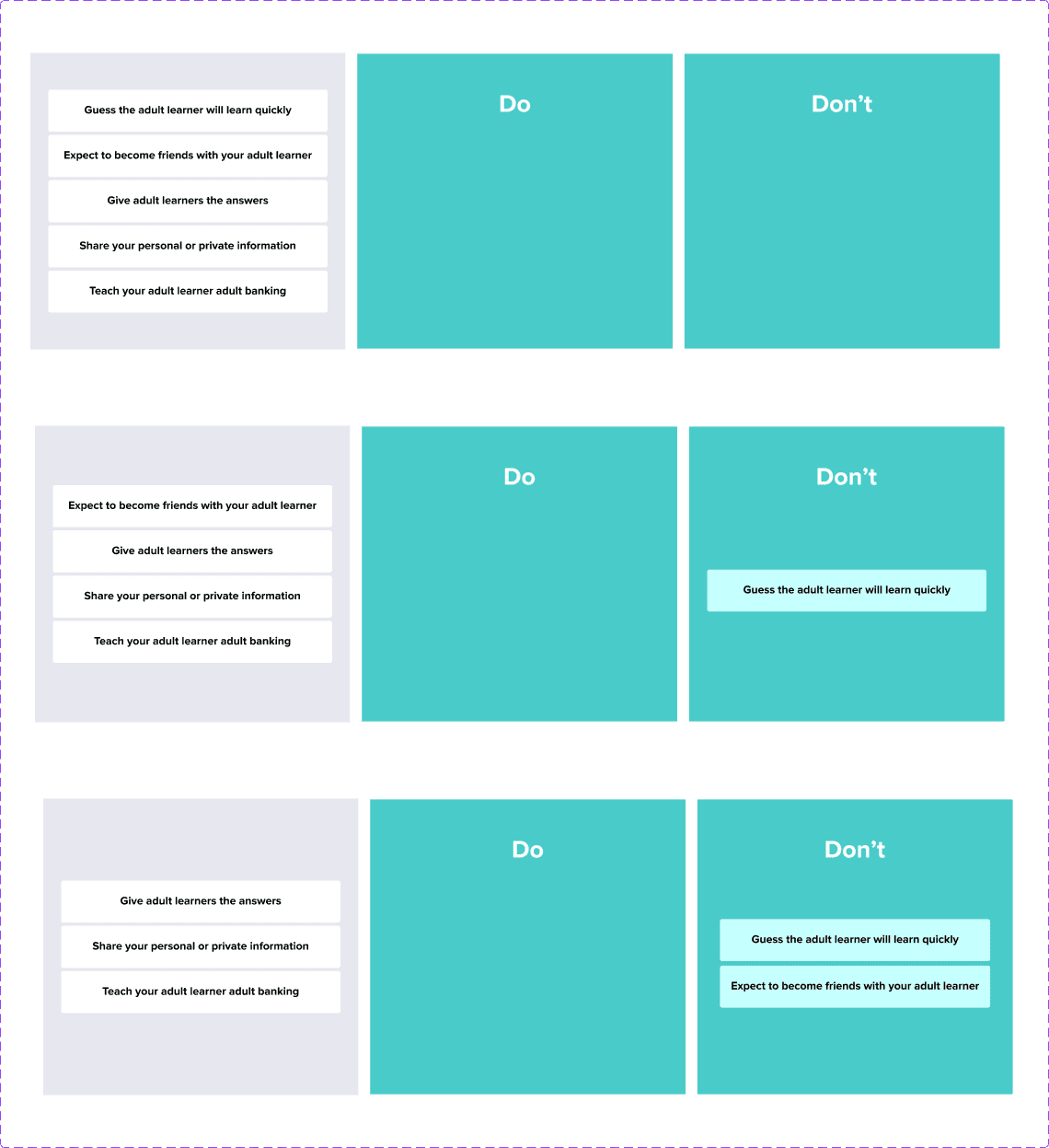
First Design: Drag and Drop
Early testing revealed that drag-and-drop interactions failed consistently on mobile devices — causing frustration and task abandonment among our primarily mobile-first users.
Early testing revealed that drag-and-drop interactions failed consistently on mobile devices — causing frustration and task abandonment among our primarily mobile-first users.
SORTING ACTIVITY
Informed Redesign: Tap to Select
Informed Redesign: Tap to Select
We redesigned all future activities to use tap-based interactions — eliminating mobile friction, improving consistency across devices, and simplifying development.
We redesigned all future activities to use tap-based interactions — eliminating mobile friction, improving consistency across devices, and simplifying development.
SORTING ACTIVITY

First Design: Tap to Pickup & Place
First Design: Tap to Pickup & Place
Stakeholders requested more pairing options for richer assessment. However, testing revealed users couldn't tell when they'd made correct matches — creating confusion about their performance & completion.
Stakeholders requested more pairing options for richer assessment. However, testing revealed users couldn't tell when they'd made correct matches — creating confusion about their performance & completion.
PAIRING ACTIVITY

Informed Iteration: Interaction Feedback
Informed Iteration: Interaction Feedback
We added clear visual feedback — coloured highlights with success messages for correct pairs, and gray with explanatory hints for incorrect ones. This gave users instant clarity on their progress.
We added clear visual feedback — coloured highlights with success messages for correct pairs, and gray with explanatory hints for incorrect ones.
This gave users instant clarity on their progress.
PAIRING ACTIVITY
30+
30+
30+
Users Tested
Users Tested
2.3/5 → 4.6/5
2.3/5 → 4.6/5
2.3/5 → 4.6/5
Mobile satisfaction scores
Mobile satisfaction scores
58% → 94%
58% → 94%
58% → 94%
Task completion rates
Task completion rates
Task completion rates
“It looks much better than the previous platform. It's a lot more engaging and easy-to-use. Love the illustrations too."
“It looks much better than the previous platform. It's a lot more engaging and easy-to-use. Love the illustrations too."
Alistair, Facilitator
REFLECTIONS
REFLECTIONS
06 — Impact & Learnings
06 — Impact & Learnings
The results, the takeaways, and how this project shaped my UX practice.
The results, the takeaways, and how this project shaped my UX practice.
Project Outcomes
Project Outcomes
Validated by Real Users
Validated by Real Users
During usability testing with youth tutors, facilitators, and program staff, the redesigned platform consistently outperformed the old system. Users described it as “way more clear,” “much faster to navigate,” and “finally something I can complete on my phone.”
Common themes:
• Eliminated disorientation from the old long-scroll layout
• Activities became easier to understand and complete
• Improved facilitator confidence with clearer navigation
• The overall experience felt modern and approachable
During usability testing with youth tutors, facilitators, and program staff, the redesigned platform consistently outperformed the old system. Users described it as “way more clear,” “much faster to navigate,” and “finally something I can complete on my phone.”
Common themes:
• Eliminated disorientation from the old long-scroll layout
• Activities became easier to understand and complete
• Improved facilitator confidence with clearer navigation
• The overall experience felt modern and approachable
Positive Stakeholder Feedback
Positive Stakeholder Feedback
Throughout the engagement, I worked directly with:
• The CEO
• YEP’s curriculum development team
• Program facilitators
• The in-house teacher team
Stakeholders consistently shared positive feedback on the:
• Improved structure
• Simplified IA
• Visual clarity
• Usability of the activities
• Thorough developer handoff
Throughout the engagement, I worked directly with:
• The CEO
• YEP’s curriculum development team
• Program facilitators
• The in-house teacher team
Stakeholders consistently shared positive feedback on the:
• Improved structure
• Simplified IA
• Visual clarity
• Usability of the activities
• Thorough developer handoff
Now in Active Development
The platform is currently being built.
In November 2025, the CEO shared the first coded prototype and requested my ongoing involvement for QA review and implementation guidance—demonstrating continued trust in my design decisions and ensuring high-fidelity execution.
This means:
• My design work is being implemented in production
• I am still engaged as the design reviewer
• The redesign is becoming a real, working product for the organization
• The system I created is becoming the foundation for future YEP programs
This is a meaningful, long-term impact for a nonprofit with international reach.
The platform is currently being built.
In November 2025, the CEO shared the first coded prototype and requested my ongoing involvement for QA review and implementation guidance—demonstrating continued trust in my design decisions and ensuring high-fidelity execution.
This means:
• My design work is being implemented in production
• I am still engaged as the design reviewer
• The redesign is becoming a real, working product for the organization
• The system I created is becoming the foundation for future YEP programs
This is a meaningful, long-term impact for a nonprofit with international reach.
What I’d Improve Next Time
What I’d Improve Next Time
1. Visual Improvements I’d Explore
1. Visual Improvements I’d Explore
With more experience, I would refine the visual hierarchy further by adding depth, shadows, and stronger emphasis states to improve scannability and polish.
With more time, we'd love to tighten the brand identity by continuing to refine and update the illustrations (we only allocated enough development time for my partner to design so many).
With more experience, I would refine the visual hierarchy further by adding depth, shadows, and stronger emphasis states to improve scannability and polish.
With more time, we'd love to tighten the brand identity by continuing to refine and update the illustrations (we only allocated enough development time for my partner to design so many).
2. Better Prototyping Systems
2. Better Prototyping Systems
If I restarted today, I'd leverage Figma's component variants and variables from the beginning — creating a more modular, scalable design system that's easier to iterate and hand off to other designers & developers.
3. Working Within Real Constraints
3. Working Within Real Constraints
Like most real-world projects, we faced constraints around time and budget. Because of this:
• Some features were delivered as static mockups instead of full prototypes
• We provided detailed written instructions and Loom walkthroughs for dev handoff
• This ensured the developer could still implement correctly
If given more time, I’d prototype all interactions to improve clarity and strengthen communication.
Like most real-world projects, we faced constraints around time and budget. Because of this:
• Some features were delivered as static mockups instead of full prototypes
• We provided detailed written instructions and Loom walkthroughs for dev handoff
• This ensured the developer could still implement correctly
If given more time, I’d prototype all interactions to improve clarity and strengthen communication.
Key Takeaways
Key Takeaways
This project strengthened my core skills:
designing within real-world constraints, transforming complex information into clear structure, and collaborating across stakeholders—from youth volunteers to executive leadership.
It reinforced for me that the best systems are structured, scalable, and grounded in actual user needs.
Project Outcomes
Validated by Real Users
During usability testing with youth tutors, facilitators, and program staff, the redesigned platform consistently outperformed the old system.
Users described it as “way more clear,” “much faster to navigate,” and “finally something I can complete on my phone.”
Common themes:
• Eliminated disorientation from the old long-scroll layout
• Activities became easier to understand and complete
• Improved facilitator confidence with clearer navigation
• The overall experience felt modern and approachable
Positive Stakeholder Feedback
Throughout the engagement, I worked directly with:
• The CEO
• YEP’s curriculum development team
• Program facilitators
• The in-house teacher team
Stakeholders consistently shared positive feedback on the:
• Improved structure
• Simplified IA
• Visual clarity
• Usability of the activities
• Thorough developer handoff
Now in Active Development
The platform is currently being built.
In November 2025, the CEO shared the first coded prototype and requested my ongoing involvement for QA review and implementation guidance—demonstrating continued trust in my design decisions and ensuring high-fidelity execution.
This means:
• My design work is being implemented in production
• I am still engaged as the design reviewer
• The redesign is becoming a real, working product for the organization
• The system I created is becoming the foundation for future YEP programs
This is a meaningful, long-term impact for a nonprofit with international reach.
What I’d Improve Next Time
1. Visual Improvements I’d Explore
With more experience, I would refine the visual hierarchy further by adding depth, shadows, and stronger emphasis states to improve scannability and polish.
With more time, we'd love to tighten the brand identity by continuing to refine and update the illustrations (we only allocated enough development time for my partner to design so many.
2. Better Prototyping Systems
If I restarted today, I'd leverage Figma's component variants and variables from the beginning — creating a more modular, scalable design system that's easier to iterate and hand off to other designers & developers.
3. Working Within Real Constraints
Like most real-world projects, we faced constraints around time and budget. Because of this:
• Some features were delivered as static mockups instead of full prototypes
• We provided detailed written instructions and Loom walkthroughs for dev handoff
• This ensured the developer could still implement correctly
If given more time, I’d prototype all interactions to improve clarity and strengthen communication.
Key Takeaways
This project strengthened my core skills:
designing within real-world constraints, transforming complex information into clear structure, and collaborating across stakeholders—from youth volunteers to executive leadership.
It reinforced for me that the best systems are
structured,
scalable,
and grounded
in actual user needs.